

EDIT EXISTING DATA
Using this section you can edit existing data. First of all you have to select data you want to change, to do that select Plant code, measure and period and apply the filter.
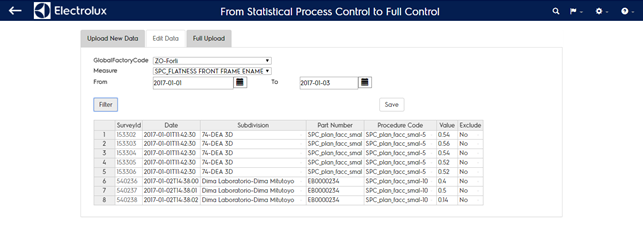
Once applied you will see the table filled with data compliant to your inquiry. You can change content of all columns except for SurveyId. To be effective, changes have to be compliant to format or existing data structure:
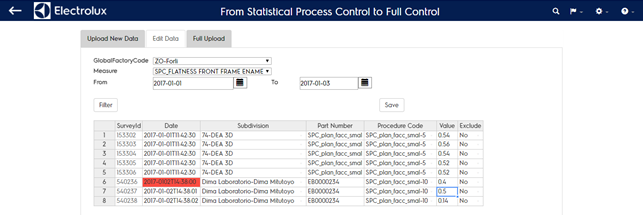
- Date has to be in the format yyyy-mm-ddThh:mm:ss. If not you will see the cell with a red background
- Subdivision can be selected among a drop down list of existing subdivisions
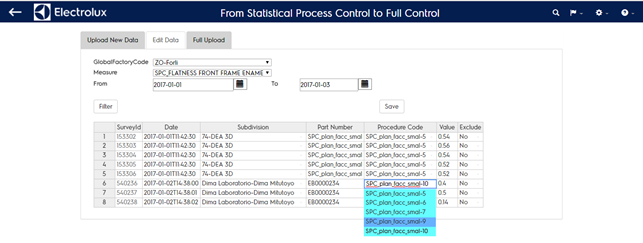
- Procedure code/revision can be selected among a drop down list of existing Procedure code/revision
- Value has to use “.” decimal separator. If not the system changes automatically “,” into “.”. This procedure could take minutes in case of long lists
- Exclude can be selected among a drop down list of two values (yes/no). If you select “yes” the row will be eliminated* from the system
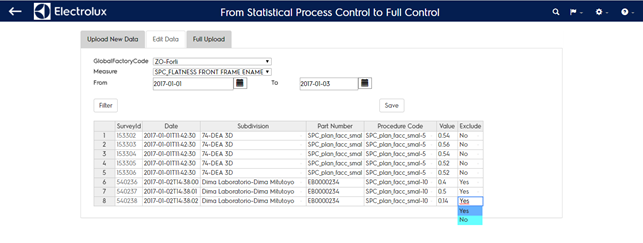
- Elimination can be reversible, contact helpdesk
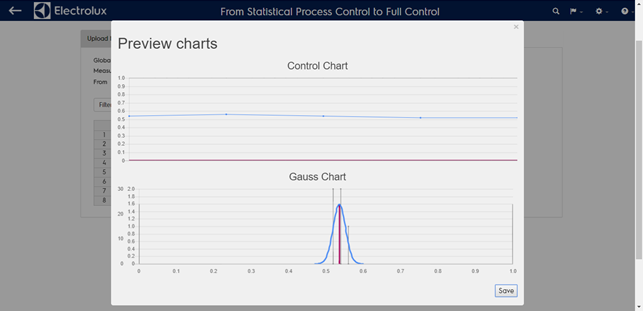
By clicking on “Save” button it a graphical preview of data that are going to be changed is shown in a popup. To undo click out of the popup, when everything is fine click on “Save” button.
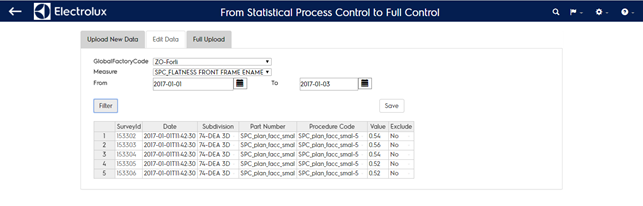
INFO: the SurveyId column identify the internal ID of that sample in the system. You have to refer to that if you wanto to use the xml file to change data of an existing sample.