

PARAMETER HOME PAGE
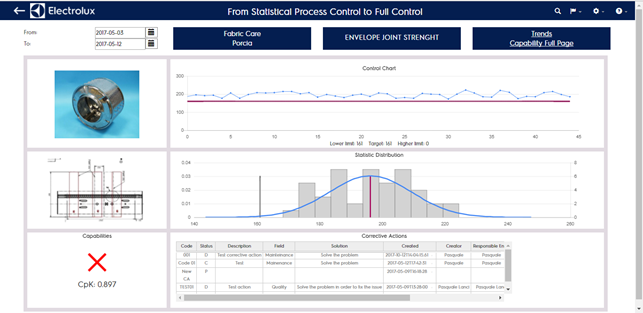
This page is about the default measure setted for the category selected, there you can find:
- Date picker top left to select the enquiry period
- Product line, Factory and Category currently selected
- Category picture (to change picture see Plant configuration -> categories section)
- Measure picture (to change picture see Plant configuration -> measures section)
- Control chart of the measure in the period
- Gauss chart of the measure in the period
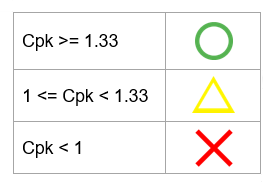
- Capabi]]lity (Cpk) of the period and qualitative estimation of it according to the mapping:
- Last 5 corrective actions connected to the measure
You can navigate forward clicking on the link “trend” or “capability full page” or backward clicking on the back arrox top left. As default settings the parameter home page shows the last 30 days trend